The Photo Project Community Review — by Megan O'Hare
This page contains affiliate links — we may earn a commission at no extra cost to you. Our methodology
$37 a Month to Fix Decades of Photo Chaos
Caroline Guntur charges $1,297 to teach you photo organization. Miss Freddy’s done-for-you service starts at $2,000. The Photo Project charges $37 a month and throws in weekly live coaching with a Certified Photo Manager.
That price gap is either a steal or a warning sign. The answer, after looking at O’Hare’s community, the 16-course curriculum, and the competitive landscape, is more straightforward than you’d expect.
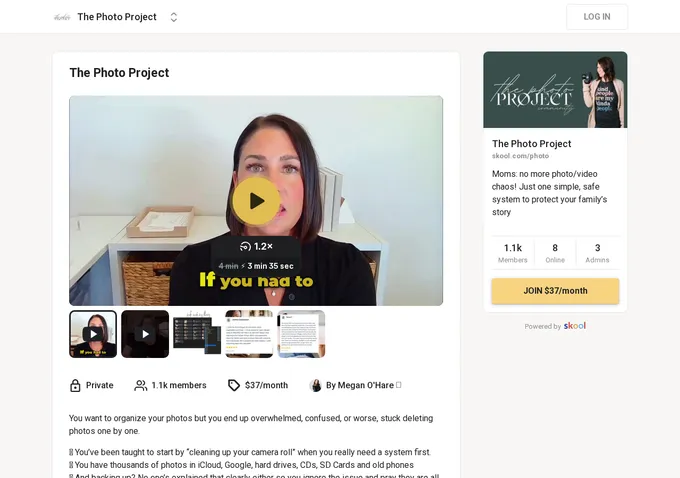
The Photo Project is a Skool community built for one specific person: the mom with 40,000 photos scattered across iCloud, Google Photos, two old laptops, and a drawer full of SD cards. The mom who has been meaning to “deal with the photos” for roughly a decade. O’Hare’s pitch is that she’ll walk you through the entire process, live, every Tuesday, for less than the cost of a family dinner out. With 1,100+ paying members and a 2026 Skool Games Award, enough people have taken her up on it to suggest the model works.
Search for an independent review of The Photo Project and you’ll come up empty. Every result leads back to O’Hare’s own websites, social accounts, or the Skool page itself. This The Photo Project review is the first outside perspective. That alone makes it worth your time if you’re deciding whether to hit the free trial button.
The Photographer Who Became a Photo Organizer
Megan O’Hare’s path to running a photo organization community started behind a camera, not in front of a screen. She’s a wedding and portrait photographer based in York, Nebraska (population roughly 8,000), specializing in newborn, family, and senior photography. Her photography business carries a 100% recommendation rate on WeddingWire.
The pivot happened when clients kept asking the same question: how do I actually store and organize all these digital photos? O’Hare realized the knowledge gap was wider than most photographers assumed. Not everyone understands cloud syncing. Not everyone knows what EXIF data is. And almost nobody has a plan for the 15 years of iPhone photos rotting in a folder called “Camera Roll.”
What separates O’Hare from the average “organize your life” influencer is the credential. She holds certification from The Photo Managers, the industry’s primary professional association, with an active directory listing since March 2020. The certification requires demonstrated expertise, client recommendations, and adherence to a professional code of ethics. Not a weekend workshop certificate. It’s the closest thing to a professional license that exists in photo management.
Before photography, O’Hare spent over a decade in marketing and public relations: brand communications, direct mail, web content, trade shows. That background shows. This isn’t someone who stumbled into course creation. This is someone who understood funnels before Skool existed.
On The Course Creator Show podcast (Episode 235), O’Hare described growing her Black Friday revenue from $7,000 to $51,000 in a single week through strategic email marketing and limited-time offers. She calls it a six-figure online course business. Those figures are self-reported. But a $7K-to-$51K jump is consistent with someone who brought professional marketing skills to a niche that badly needed them.

16 Courses, 219 Modules, and One Very Specific Problem
The curriculum covers the full photo organization workflow: consolidation from scattered sources, sorting, naming conventions, duplicate removal, backup strategies, and ultimately creating family photo books. That’s 219 modules across 16 courses, which makes this one of the most substantial course libraries in the photo organization niche.
The scope matters. Photo organization isn’t a single skill. It’s a chain of decisions that starts with “where are all my photos?” and ends months later with “here’s my daughter’s baby book, finally.” Most competitors sell you one piece of that chain. DPO PRO’s $1,297 masterclass covers six modules. Miss Freddy breaks it into separate courses (Backup Bootcamp, Organizing Old Photos, Family Yearbooks) that you purchase individually. O’Hare bundles the entire journey into one subscription.
What makes the content distinctive is the community discussion feed, which reveals technically specific topics rather than motivational fluff. Members troubleshoot EXIF data issues, discuss workflow tools like Album Stomp, and work through the unglamorous reality of deleting 175,000 duplicate screenshots. Nobody here is posting sunrise photos with inspirational captions. This is a working community where someone asks how to merge two iCloud accounts and gets a real, tested answer.
The limitation: course titles and individual module names aren’t visible on the public Skool page. You can see the 16-course, 219-module scope but can’t evaluate curriculum quality until you’re inside. The free trial partially addresses this, but if you’re the type who wants to read every syllabus before enrolling, the opacity will frustrate you.
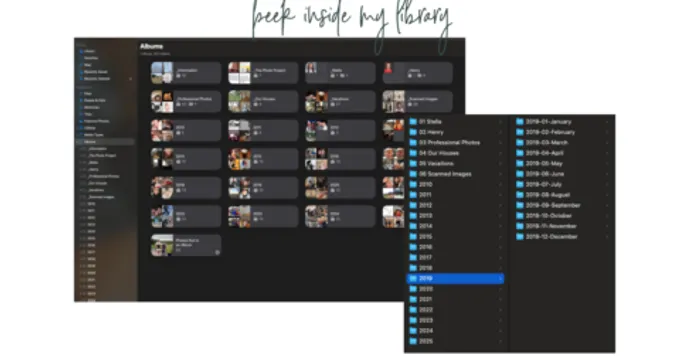
The Photo Project bundles the full photo organization workflow into a single $37/month subscription with live coaching. Most competitors either charge $1,297+ for a one-time course or sell the steps separately without ongoing support.
1,149 Members, One Very Active Founder
Log into The Photo Project on any given day and you’ll find about 12 members online out of 1,149 total. The discussion feed holds 1,527 posts, roughly 1.3 per member over the community’s lifetime. Modest numbers. But the real activity doesn’t live in the feed. It lives in the course modules and the Tuesday Zoom calls.

The real engagement anchor is the weekly live session. Every Tuesday at 12pm CST, O’Hare hosts a Zoom call where members can share their screen and get personalized troubleshooting. All sessions are recorded. If your photo library has a weird iCloud sync issue at 2am on a Saturday, you can’t get live help, but you can post in the community and expect a response within 24 hours during the Monday-through-Thursday office hours.
Three admins support the community alongside O’Hare. That’s a 1:383 admin-to-member ratio, which is thin compared to larger Skool operations but adequate for a community where the founder is genuinely present and consistently responsive. O’Hare’s social footprint (38,000 Instagram followers, 10,000+ Facebook page likes) suggests an audience that extends well beyond Skool, feeding a steady pipeline of new members.
The Skool page claims O’Hare has “helped over 9,000 women organize their photo collections.” Current Skool membership: 1,149. The gap isn’t mysterious: that 9,000 spans standalone courses, the Family Yearbook Bootcamp on Teachery, done-for-you clients, and free resource downloads accumulated over years. Reasonable math. But the marketing lets you assume all 9,000 are in the room with you, and they’re not.
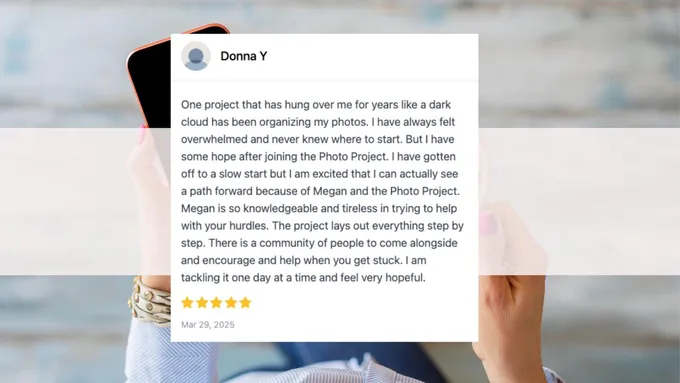
One member testimonial stands out. She described being “honestly overwhelmed and a little paralyzed about doing this ‘right’” before joining.

Another condensed 200,000 photos down to roughly 25,000.
That’s not a curriculum testimonial. That’s a before-and-after for someone’s entire digital life, accomplished through weekly check-ins and steady chipping away at the backlog. The pattern across testimonials isn’t “this changed my life.” It’s “I finally started.”
For a community targeting people who’ve been stuck for years, that’s the right outcome to produce.
O’Hare also offers a done-for-you photo organization service (separately priced via discovery call, minimum one-month engagement) as an escalation path for members who decide they’d rather pay a professional than do it themselves. It’s a smart business move that also functions as a pressure release valve: if the DIY process gets overwhelming, there’s an exit that doesn’t mean quitting.
One quirk: both skool.com/photo and skool.com/tppcommunity lead to the same community with identical metrics. The “tppcommunity” URL is a legacy slug. If you’ve seen both links and wondered whether there are two separate communities, there aren’t.
Is $37 a Month Worth It?
At $37 per month, The Photo Project sits at the accessible end of Skool’s pricing spectrum. There’s a free trial (duration not publicly specified) to evaluate before committing. No annual plan is available. The refund policy is firm: “Due to the nature of the membership with immediate access refunds are not offered.”
The competitive picture makes the pricing clearer. DPO PRO by Caroline Guntur is the premium alternative: $1,297 one-time for a six-module masterclass with 12 months of group coaching access. It’s endorsed by The Photo Managers and taught by an advisory board member of the association. If you want the most credentialed, most comprehensive standalone product, that’s where to go. But there’s no ongoing community after the coaching window closes, and $1,297 is a significant upfront commitment for organizing family photos.
Miss Freddy targets a similar audience (moms) with self-paced courses and the “Yabba Dabba Do Crew” accountability membership. The approach is different: accountability partners rather than expert-led live coaching. No weekly Zoom calls where you share your screen with a certified professional.
Capture Your Photos offers platform-specific blueprints (Mac vs. PC tracks) without any community component. Family Photo Keeper Academy runs a subscription learning community for a broader demographic. Organizing Moms covers photo organization as one topic among many in a general lifestyle brand. None of them combine live expert coaching with a structured multi-course curriculum at a consumer-friendly price. That’s The Photo Project’s lane, and nobody else is in it.

The Photo Project’s value proposition crystallizes when you do the math. Six months of membership costs $222 total. For that, you get 16 courses, 26 live coaching sessions with a Certified Photo Manager, and ongoing community access. DPO PRO’s six modules alone cost nearly six times that. The tradeoff: it’s recurring rather than one-time, and the no-refund policy means your only risk mitigation is the free trial.
Value is the strongest dimension in this community. It’s not close.
Who Should Join (and Who Should Look Elsewhere)
The ideal member has a specific profile. She’s been meaning to organize her family’s photos for years. She has photos on her phone, her husband’s phone, an old laptop in the closet, a Google Photos account she forgot about, and an external hard drive from 2016. She’s tried starting the project twice and both times got overwhelmed by the scope. She doesn’t need motivation posters. She needs someone to say “start here, do this, come back Tuesday and show me your progress.”
That’s exactly what The Photo Project delivers.
If you’re already somewhat organized and just need a tool recommendation, this is more structure than you need. If you’re a professional photo organizer looking for business training, DPO PRO is the better fit since it’s designed for both consumers and aspiring professionals. And if you’re on a tight budget and $37 per month feels like a stretch, Organizing Moms offers free photo organization guides that cover the basics without a subscription.
- You have years of scattered family photos across multiple devices and cloud services and need a structured system to organize them.
- You want weekly live coaching with a Certified Photo Manager who can troubleshoot your specific setup through screen sharing.
- You prefer a low monthly commitment ($37) over a $1,297 one-time course, with the option to cancel once your project is complete.
- You're already organized and just need a tool recommendation, not a full curriculum and community.
- You want to verify course content before committing, since module details aren't visible until you join (though the free trial helps).
- You need independent reviews to validate your purchase decision: none exist outside of the creator's own platforms.
The Bottom Line
The Photo Project earns a clear Recommended verdict. The value dimension is the standout: $37 per month for the combination of a 16-course curriculum, weekly live coaching from a credentialed expert, and a community of peers tackling the same problem is genuinely hard to beat in this niche. Content and support are solid. Community engagement is adequate, not exceptional.
The caveats are real. No independent reviews exist anywhere online, which means this The Photo Project review is your primary outside perspective. The refund policy is stricter than most Skool communities. And the “9,000 women helped” figure on the Skool page requires a footnote that the marketing doesn’t provide.
Remember that price gap from the opening? $37 versus $1,297. After looking at what each option actually delivers, the gap makes more sense than it initially appears. O’Hare isn’t undercutting competitors by offering less. She’s offering a different model: ongoing access at an accessible price instead of a premium one-time product. For the mom who’s been staring at a chaotic photo library for five years and just needs someone to walk her through it, step by step, every Tuesday at noon, that model is exactly right.
The free trial is the obvious next step. You’ll see the 16 course titles, the module structure, and the community feed before paying anything. Guntur charges $1,297 to teach you how to organize your photos. O’Hare charges $37 a month to sit with you while you actually do it. Which one you need depends on whether your problem is knowledge or follow-through.
Pros & Cons
What We Like
- At $37/month, The Photo Project costs a fraction of alternatives like DPO PRO ($1,297 one-time) while providing weekly live coaching, 16 courses, and community support that most competitors don't offer at any price.
- Weekly live Zoom calls with a Certified Photo Manager include screen sharing for personalized troubleshooting — a hands-on support model rare in the photo organization education space.
- The 219-module curriculum covers the complete photo organization workflow from consolidation through backup and photo book creation, eliminating the need to purchase multiple courses elsewhere.
- A free trial allows prospective members to evaluate the community and course content before committing to monthly payments.
- O'Hare holds Certified Photo Manager accreditation from The Photo Managers (active since 2020), providing professional credibility backed by an industry association.
What Could Improve
- The community explicitly states that refunds are not offered after the free trial due to immediate access to membership content.
- No independent reviews exist on Reddit, Trustpilot, or third-party review platforms — all available testimonials originate from the creator's own channels.
- The "9,000+ women helped" claim on the Skool page aggregates all touchpoints over multiple years, while current active Skool membership is 1,149.
- Course titles and individual module content are not visible on the public Skool page, requiring the free trial to evaluate curriculum quality and relevance.
Pricing
Free Trial
Free
- Full access to community and courses during trial period
Monthly Membership
$37/mo
- 16 courses with 219 modules covering the full photo organization workflow
- Weekly live Zoom coaching with Megan O'Hare (Tuesdays 12pm CST)
- Recorded call replays for all live sessions
- Community discussion feed with peer support
- Office hours Monday through Thursday with 24-hour response time
- Photo Project Intensive eligibility (8-week small-group experience)
Frequently Asked Questions
Is The Photo Project by Megan O'Hare worth $37 a month?
What qualifications does Megan O'Hare have to teach photo organization?
Can I cancel The Photo Project membership anytime?
What exactly do I get inside The Photo Project community?
Do I need to be tech-savvy to use The Photo Project?
How does The Photo Project compare to DPO PRO or Miss Freddy's courses?
How long does it take to organize all my photos with this program?
Affiliate Disclosure: CommunityHunter may earn a commission if you join through our links. This does not affect our ratings or editorial independence. Read our methodology.
Ready to join The Photo Project?
Starting from $37/mo
Similar Hobbies Communities
About the Creator
Megan O'Hare
Founder
Certified Photo Manager, professional photographer, and former marketing professional with 10+ years of PR experience. Based in York, Nebraska, O'Hare built The Photo Project after clients repeatedly asked how to organize their digital photos, turning a common pain point into a six-figure education business.